
Note: These enhancements are only available to existing users with the ID Verified package enabled.
We’re excited to announce new upgrades to AVA™ ID that will give your dealership greater control and insight in the ID verification process.
With more robust verification checks, AVA™ ID now empowers dealers to detect and address potential fraud with more precision and confidence!
What’s New with AVA™ ID?
The latest version of AVA™ ID strengthens fraud detection capabilities and pinpoints synthetic IDs with advanced checks that help identify high-risk profiles.
Key Enhancements in AVA™ ID
-
Expanded ID Statuses: Enhanced status categories provide clear visibility into each stage of ID verification, making it easy to monitor progress and flag any risks.
-
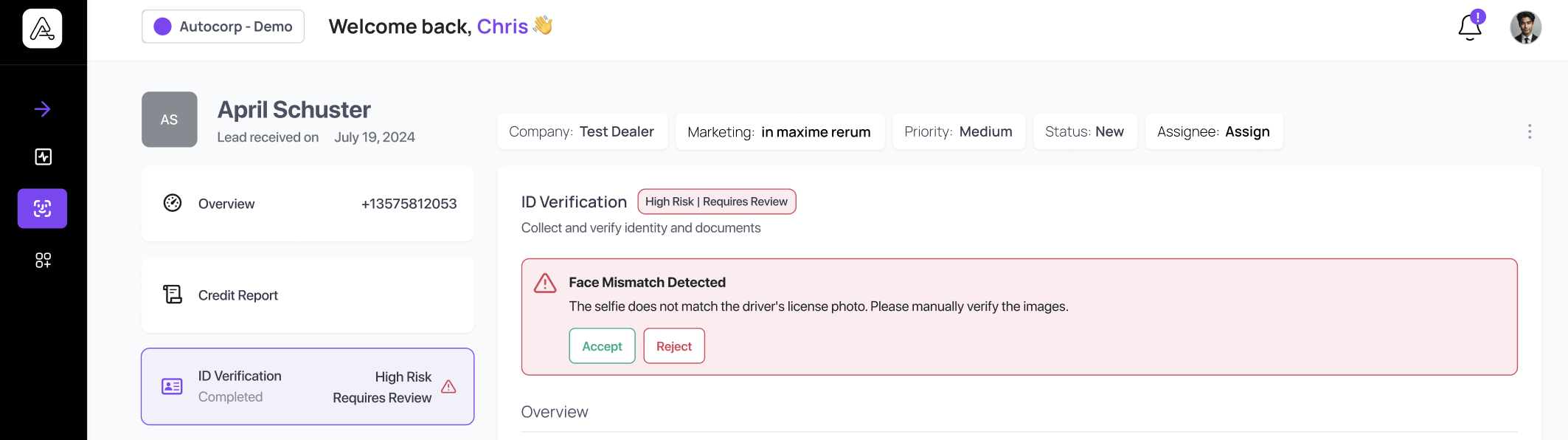
Overview Status Badge: A status badge now appears on lead details, summarizing the ID verification outcome for quick reference.
-
Highlighted High-Risk Failures: High-risk failed checks are prominently displayed to help dealers quickly assess the severity of ID issues.
New ID States Added for Even Greater Clarity
Each verification now has a specific status based on the check outcomes:
-
Verified: All checks passed.
-
Requires Review: Failed one or more required or non-required high-risk checks.
-
High Risk | Requires Review: Significant risk indicators detected.
Government ID Checks
| Check name | State | Description |
| Compromised submission | Required | Detect if the submission can be found from a publicly available source (e.g. Google Images). |
| Allowed ID type | Required | Detect if the ID type (e.g. driver license) submitted does not match the ID type the user selected. |
| Allowed country | Required | Detect if the country of the ID is not allowed based on template requirements. |
| Government ID | Required | Detect if there is a government ID in the submission. |
| Expiration | Required | Detect if the ID is expired. |
| MRZ Detected | Required | Detect if there is encoded, machine-readable text on the ID. |
| Portrait | Required | Detect if there is a face portrait in the submission. |
| Barcode inconsistency | Required | Detect inconsistencies in the barcode on the ID. |
| Double side | Required | Detect if one side of the ID is submitted as both front and back. |
| Electronic replica | Required | Detect if the submission is a replica of an image presented on another electronic device or screen. |
| Extraction inconsistency | Required | Detect if the details extracted from the front of the ID are different than the details extracted from the barcode. |
| Fabrication | Required | Detect if the ID is likely to be fabricated, based on its format and issuing entity. |
| Inquiry comparison |
Required
|
Compare if ID details like name or birthdate are inconsistent between different submission attempts. |
| Paper detection | Required | Detect if the ID is a paper copy. |
| Public figure | Required | Detect if the face portrait matches that of a known public figure. |
| Repeat | Required | Detect if the ID details and face portrait match that of a previously submitted ID on a different account within the last year. |
| ID image tampering | Required | Detect if the submission is tampered by a photo editor. |
| ID physical tampering | Required | Detect if the submission is physically tampered. |
| Portrait clarity | Not required | Detect if the face portrait is clear and in focus. |
| Account comparison | Not required | Compare if government ID details (e.g. name, birthdate) are consistent with account details. |
| Age comparison | Not required | Detect if the age listed on the ID meets the age restriction. |
| Barcode | Not required | Detect if there is a barcode on the ID. |
| Color | Not required | Detect if the colors on the ID are different than the expected colors. |
| Corner detection | Not required | Detect if the submitted ID is fully in frame with all four corners visible. |
| Extracted properties | Not required | Detect if template-required ID details are extracted. |
| Glare | Not required | Detect if the submission has glare. |
| Inconsistent repeat | Not required | Detect if either the ID details or face portrait match that of a previously submitted ID within the last year. |
| MRZ Inconsistency | Not required | Detect if the encoded, machine-readable text on the ID is well-formed. |
| ID number format inconsistency | Not required | Detect if the ID number format is well-formed based on issuing authority rules for certain countries. |
| Processable submission | Not required | Detect if the submission is unprocessable. |
| Video quality | Not required | Detect if the video is high enough quality. |
| Experimental | Not required | Experimental fraud checks. |
| Damaged detection | Not required | Detect physical damages on the ID that render it invalid for verification. |
Selfie Checks
| Check name | State | Description |
| Selfie-to-ID comparison | Required | Compare if the selfie and the face portrait in the ID are different faces. |
| Selfie liveness | Required | Detect if the selfie contains a live individual, not a recording, picture, or another spoof. |
| Multiple faces | Required | Detect if the selfies are different faces across poses. |
| Pose position | Required | Detect if the face in the selfies are correctly positioned across all poses. |
| Pose repeat | Required | Detect if the selfies are exact repeats across poses. |
| Age comparison | Required | Detect if the perceived age from the selfie is different from the reference age. |
| Portrait quality | Required | Detect if the face portrait is clear and in focus. |
| Public figure | Required | Detect if the selfie submission matches a known public figure. |
| Suspicious entity | Required | Detect if the selfie submission is that of a government ID. |
| Account comparison | Not required | Compare if the selfie is inconsistent with the account portrait. |
| Age threshold comparison | Not required | Detect if the perceived age from the selfie complies with min and/or max age limits. |
| Face covering | Not required | Detect if face was covered in the selfie. |
| Glare | Not required | Detect if the submission has glare. |
| Glasses | Not required | Detect if glasses are present. |
| Video quality | Not required | Detect if the selfie video is high enough quality. |
| Experimental | Not required | Experimental fraud checks. |
| Image quality | Not required | Detect if the submission has low image quality. |
| Persona comparison | Not required | Compare if the selfie is inconsistent with the Reusable Persona. |
New Verification Checks Added
-
Barcode
-
Electronic replica
-
Extraction inconsistency
-
Fabrication
-
Paper detection
-
ID image tampering
-
Barcode inconsistency
New Required Checks
-
Electronic replica
-
Extraction inconsistency
-
Fabrication
-
Paper detection
-
ID image tampering
High Risk Checks
-
Fake Document
-
Non-Original Document
-
ID Image Alteration Detected
-
Publicly Available Image Detected
-
Liveness Check Failed
-
Face Mismatch Detected
With these enhancements, AVA™ ID provides dealerships with even more power to manage ID verification securely and efficiently!
Questions? Want to see how these enhancements can work for you?
Reach out to us at support@autocorp.ai for assistance or for any further questions, we are always happy to help!