
Why Use This Feature
Every dealership has the same story. A walk-in spends 45 minutes with your best rep. They test drive. They sit down at the desk. And that is when you find out they cannot get approved. Meanwhile, a qualified buyer came and went because nobody was available.
Credit checks happen too late in the traditional process. By the time you have the information you need, you have already invested the time you cannot get back.
VeriDrive Credit moves the credit check to the very beginning of the conversation. The customer verifies their ID and gets their free Equifax credit snapshot on their own phone before the test drive begins. Your desk has the full bureau before the first number is written. No surprises. No wasted hours. No deals falling apart at F&I.
Who Should Use This
This workflow is recommended for:
- Floor sales reps initiating the QR code or SMS link at the greeting
- Sales managers and desk managers receiving the bureau and structuring deals
- F&I directors accessing the full credit profile before the customer reaches their office
Before You Start
Make sure you:
- Have VeriDrive Credit enabled on your dealership account. If you are unsure, contact your Client Success Manager before proceeding.
- Have your QR code accessible and ready. It can be displayed on a tablet, a counter card, a floor stand, or the existing signage poster at your dealership.
- Brief your team to introduce VeriDrive Credit in the first two minutes of every walk-in greeting, before showing any vehicles and before the test drive. Introducing it after the test drive is too late.
Workflow
Step 1 — Greet the Customer and Show the QR Code

Greet the Customer and Show the QR Code or Send the Link When the customer arrives, show them the QR code on your tablet or signage. Alternatively, send them a direct SMS link through the AVA Portal. The customer does not need to download an app. They just open the link on their own phone.
Step 2 — Customer Enters Their Phone Number and Provides Consent
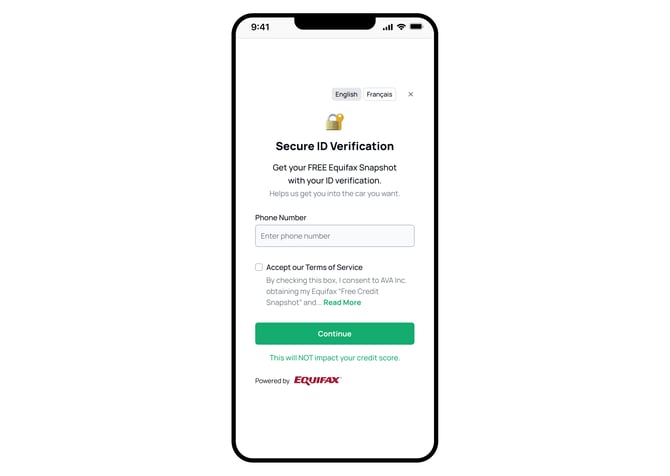
The customer opens the link and lands on the Secure ID Verification screen. They enter their phone number and check the Terms of Service box to consent to the free Equifax Credit Snapshot. The screen clearly states this will not impact their credit score and shows Equifax branding.
Step 3 — Customer Completes ID Verification
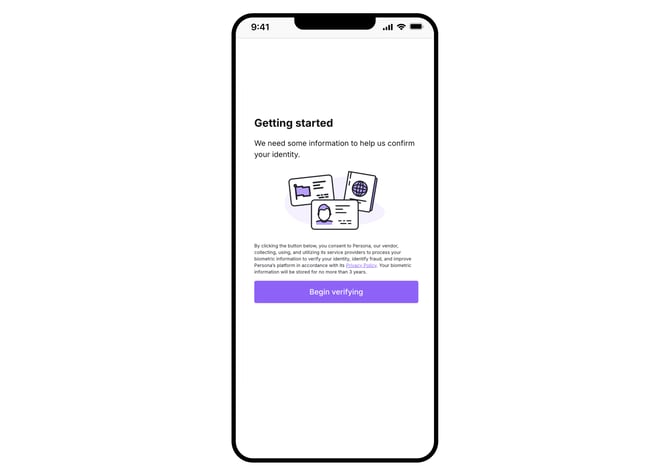
After tapping Continue, the customer moves to the "Begin verifying" screen. They photograph the front and back of their driver's licence and take a quick selfie. Everything happens on their own device privately. Your rep does not need to see their screen or touch their device. This step takes approximately 30 seconds.
Step 4 — Customer Sees Their Verified Status and Credit Score
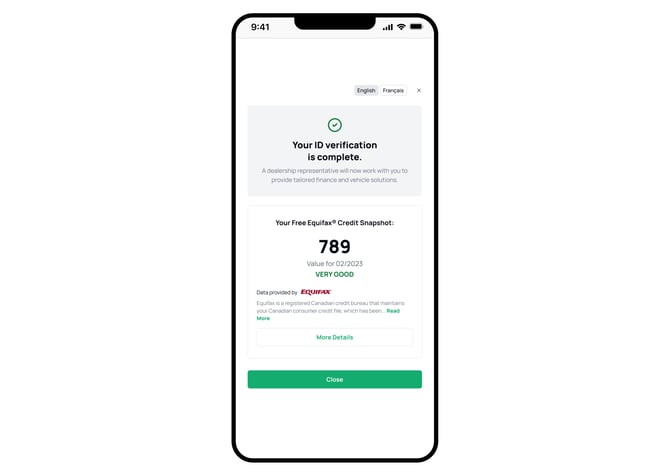
The customer's ID verification status and Equifax credit score appears on their phone instantly. They can see their score, their rating, credit inquiries for the past 30 days, and active trade lines.
Step 5 — Desk Reviews the Full Profile and Structures the Deal
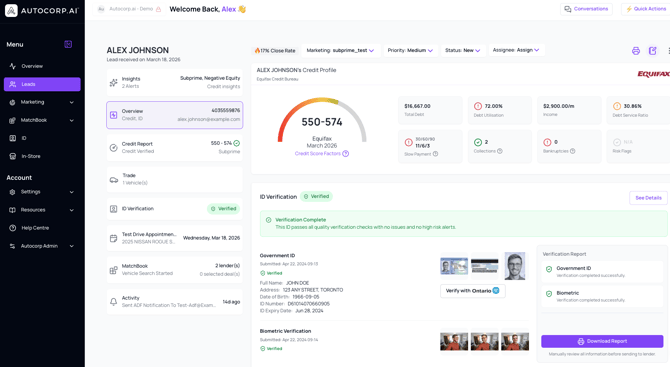
Your desk manager opens the AVA Portal and reviews the verified ID and complete Equifax bureau before the customer returns from the test drive. The profile shows credit score and tier rating, masked identity details, active trade lines, and inquiry count from the past 30 days. Structure the deal from real data, not assumptions.
What You Can Expect
Using this workflow helps your team:
- Qualify every walk-in in the first two minutes of the interaction, not the last
- Structure deals with complete credit data from the start, before the customer reaches the desk
- Reduce late-stage deal breakdowns at F&I because there are no surprises
- Give customers a better experience because they know their own numbers before they fall in love with a vehicle
Pro Tips
Lead with "free credit snapshot" rather than "credit check." The language matters. Customers are more receptive when they understand there is no score impact and they get to see their own number right away.
Let the customer complete the flow on their own phone privately. Do not hover during the ID and consent steps. The 60-second window is a natural moment for your rep to pull up inventory options that match the customer's likely range.
Position this as a desk standard, not a rep option. When the desk manager asks for credit data before any deal is presented, your team uses VeriDrive Credit consistently. That consistency is what drives the close rate improvement.
If a customer asks whether this is a credit check, say: "It is a soft snapshot only, no hard inquiry, no impact to your score. You actually get to see your own score right on your phone after." If they ask whether it will affect their score, say: "Zero impact, guaranteed. Soft pull only."
If a customer says they are just browsing, say: "No pressure at all. If you do find something you love today, this way you will already know what you are working with so there are no surprises at the end."
Need Help?
💬 Chat inside your portal | 📧 support@autocorp.ai | 📞 1 (877) 255-8627