---
title: "Internal Training: Onboarding Cards & Accelerated Dealer Activation"
description: "The new Onboarding Status Cards and centralized channel workflows were introduced in March 2026 to simplify dealer setup, reduce confusion, accelerate onboarding time-to-value, and provide better visibility into configuration and performance. The Leads page now features four key activation cards: Website, CRM, Teams, and Campaigns."
---
[Skip to content](https://getautocorp.com/en-ca/help/internal-training-onboarding-cards-accelerated-dealer-activation#main-content)
English - Canada
Show submenu for translations

Open main navigation
Close main navigation
- English - Canada
Show submenu for translations
- [Request Support](https://getautocorp.com/request-support)
[Request Support](https://getautocorp.com/request-support?hsLang=en-ca)
How can we help you?
- There are no suggestions because the search field is empty.
1. [AVA Help Centre](https://getautocorp.com/en-ca/help?hsLang=en-ca)
March 12, 2026
# Internal Training: Onboarding Cards & Accelerated Dealer Activation
## The new Onboarding Status Cards and centralized channel workflows were introduced in March 2026 to simplify dealer setup, reduce confusion, accelerate onboarding time-to-value, and provide better visibility into configuration and performance. The Leads page now features four key activation cards: Website, CRM, Teams, and Campaigns.
### **Why Use This Feature**
This new process standardizes and streamlines the dealer activation journey, solving the challenge where dealers previously had to navigate multiple areas of the portal for channel configuration with no clear view of completion.
### **Who Should Use This**
This workflow is recommended for:
- Sales Teams (Demos & Scoping)
- Client Success Teams (Onboarding & Activation)
- Support Teams (Troubleshooting)
### **Before You Start**
Make sure you:
- Understand the purpose and benefits of each of the four cards (Website, CRM, Teams, Campaigns).
- Can access the centralized channel details page (starting with Website).
- Know the success metrics to track for activation (KPIs).
### **Workflow**
This section outlines the guided flow for the customer/end-user and the talking points for internal teams.
#### Step 1 — **End-User Flow: Initial Login**
**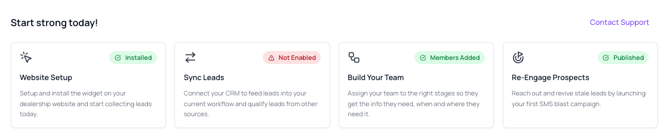**
The dealer logs into the AVA Portal and lands on the Leads page, where the Onboarding Status Cards display the activation progress (Not Started, In Progress, Active).
#### Step 2 — **Action: Website Setup**
**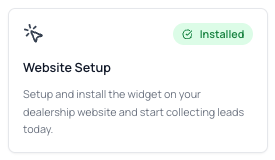**
The dealer clicks the Website card to review installation status and follows the instructions or connects with their CSM if not active.
#### Step 3 — **Action: CRM & Teams**
**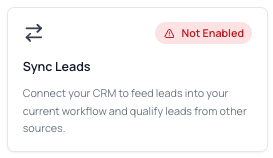**
The dealer clicks the CRM card to confirm ADF integration, and then adds team members through the Teams card.
#### Step 4 — **Action: Campaigns**
**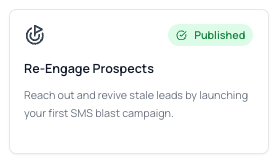**
The dealer activates or creates a campaign through the Campaigns card.
#### Step 5 — Result: Full Activation
All four cards display **Active**, confirming successful onboarding (website capture, CRM syncing, team access, and live campaigns are functional).
### **Client Objections & Overcoming Them**
This table shows common objections and the best internal response.
| Objection | Response |
| --- | --- |
| "This looks like more setup work." | The cards simplify setup by showing exactly what needs to be done, reducing back and forth and eliminating guesswork. |
| "We already installed the widget before." | The Website card verifies installation and confirms that leads are actively being received, providing reassurance and visibility. |
| "Our CRM integration is handled by IT." | The CRM card clearly shows whether leads are exporting successfully, helping avoid missed opportunities without requiring technical expertise. |
| "We don't have time to manage campaigns." | The Campaigns card provides a clear activation path and visibility into performance, making it easy to start with one campaign and scale gradually. |
### **What You Can Expect**
Using this workflow helps users:
- Achieve a high percentage of dealers with all four cards in **Active** status.
- Reduce the average time from account creation to full activation.
- Increase the website widget installation completion rate and CRM integration completion rate.
### **Pro Tips**
- Use the onboarding cards as a live checklist during activation calls.
- Proactively monitor card status to identify and address stalled accounts.
- Guide dealers through the Website channel page to confirm widget installation and CTA placements.
### **Need Help?**
💬 Chat inside your portal
📧 support@autocorp.ai
📞 1 (877) 255-8627
- [Getting Started & Account Setup](https://getautocorp.com/en-ca/help/getting-started-account-setup?hsLang=en-ca)
- [Website Setup & Installation](https://getautocorp.com/en-ca/help/website-setup-installation?hsLang=en-ca)
- [Leads & Integrations](https://getautocorp.com/en-ca/help/leads-integrations?hsLang=en-ca)
- [Campaigns & Marketing](https://getautocorp.com/en-ca/help/campaigns-marketing?hsLang=en-ca)
- [AVA™ Credit](https://getautocorp.com/en-ca/help/ava-credit?hsLang=en-ca#main-content)
- [TransUnion](https://getautocorp.com/en-ca/help/ava-credit?hsLang=en-ca#transunion)
- [AVA™ ID](https://getautocorp.com/en-ca/help/ava-id?hsLang=en-ca)
- [AVA™ VeriDrive](https://getautocorp.com/en-ca/help/ava-veridrive?hsLang=en-ca)
- [AVA™ Trade](https://getautocorp.com/en-ca/help/ava-trade?hsLang=en-ca)
- [AVA™ MatchBook](https://getautocorp.com/en-ca/help/ava-matchbook?hsLang=en-ca)
- [Guides, Tips & Strategies](https://getautocorp.com/en-ca/help/guides-tips-strategies?hsLang=en-ca)
- [Billing & Invoicing](https://getautocorp.com/en-ca/help/billing-invoicing?hsLang=en-ca)
- [Internal Only](https://getautocorp.com/en-ca/help/internal-only?hsLang=en-ca#main-content)
- [Support (Troubleshooting & FAQ’s)](https://getautocorp.com/en-ca/help/internal-only?hsLang=en-ca#support-troubleshooting-faqs)
[](https://cdn.prod.website-files.com/668415686f0a8cf761c4b334/66844e747562f707f0c5499d_2023-Autocorp-TM-Logo-WH-Transparent%404x.png)
[mailto:email@email.com](mailto:email@email.com)
Copyright © 2025, Autocorp.ai